Ever wondered why some websites feel effortless to navigate while others leave you lost in a maze of unreadable links? Whether you are building a SaaS dashboard, an e-commerce store or a content-heavy blog, your URL structure matters far more than most teams assume.
A clean, logical URL space improves search visibility, earns user trust, makes the system easier to maintain, and saves you from painful migrations later. Yet URL standards are one of the most commonly skipped decisions in a project - until the inconsistency becomes impossible to unwind.
This guide covers the whole surface: static routes, dynamic routes, slugs versus IDs, hierarchy, query parameters, hash fragments, encoding and the advanced rules that keep a URL space healthy for years.
Why URL structure matters
A URL is more than a technical address. It is part of your brand, your search footprint and your user's journey.
For search. Engines use URLs to understand page context, judge relevance and crawl efficiently.
For users. Readable URLs are easier to scan, share, remember and trust. People do read them before clicking.
For maintainability. A predictable structure makes routing, debugging and scaling dramatically simpler.
For sharing. Short, descriptive URLs survive email clients, chat apps and social platforms without breaking or looking suspicious.
For analytics. Consistent path patterns let you group and compare pages reliably instead of cleaning up report noise by hand.
Core standards
1. Use lowercase only
URL paths are case-sensitive on most servers, which means /About and /about can resolve to two different pages - or one 404. (The domain itself is case-insensitive; the path is where it bites you.) Standardise on lowercase everywhere and redirect anything else.
/about-us/About-Us2. Separate words with hyphens
Hyphens improve readability and are treated as word separators by search engines. Underscores are treated as joiners, and camelCase reintroduces the case problem above.
/our-products/our_products or /ourProducts3. Keep them short, descriptive and meaningful
/contact/this-is-our-contact-page-for-customers4. Keep query parameters out of primary URLs
Prefer clean paths for canonical content. Reserve query parameters for filtering, sorting and other non-identifying variations.
/product/coffee-mug/product?id=123455. Reflect the site hierarchy
The URL should mirror the logical structure of the site, so both users and crawlers can infer relationships between pages.
/blog/web-design-trends/web-design-trendsDynamic URLs
Dynamic URLs point at content generated from a database record or user input. Unlike static URLs, which map to fixed content, they contain a variable segment identifying which record to render.
Typical cases:
- User profiles -
/users/1234 - Product pages -
/products/notebook - Search results -
/search?q=laptops - Filtered listings -
/products?category=laptops&brand=dell
The shape is usually a template with one variable segment:
/products/{product-id}Slugs versus IDs
Both work. They optimise for different things.
Using slugs
A slug is a human-readable identifier derived from a title - best-laptop-for-gamers rather than 8842.
/products/{product-slug}Slugs are search-friendly because they describe the content, memorable because they read like language, and they make the URL genuinely useful when pasted somewhere without context.
Using IDs
IDs are the better choice when a slug is impractical, unstable, or would leak information you would rather not expose.
/products/{product-id}They guarantee you are referencing exactly one record, they never collide, and they do not need regenerating when a title changes.
IDs are not inherently secure. A sequential integer ID is trivially enumerable - /orders/1001 invites someone to try /orders/1002. If the identifier itself needs to resist guessing, use a UUID or another non-sequential value. And either way, always enforce authorisation on the server: obscurity is not access control.
Choosing between them
| Use a slug when | Use an ID when |
|---|---|
| Search visibility matters | Titles change frequently or are not unique |
| The content is public-facing | The record is internal or access-controlled |
| Titles are stable and descriptive | You are generating URLs at very high volume |
| Users may share or type the URL | Slug generation would be lossy or ambiguous |
Combining both
A common compromise keeps readability and guarantees uniqueness at the same time:
/products/{product-slug}-{product-id}
/products/best-laptop-123456
The slug carries meaning for humans and crawlers; the ID does the actual lookup, so renaming the product never breaks the link.
Hierarchical structure
When content has a genuine nested relationship, the URL should express it. For an educational platform, for example:
/schools/
/schools/{school-id}/classes/
/schools/{school-id}/classes/{class-id}/students/
/schools/{school-id}/classes/{class-id}/students/{student-id}
Schools contain classes; classes contain students; every entity is individually addressable. This is intuitive to navigate and makes the relationships explicit to a crawler.
Hierarchy fits naturally for educational platforms, e-commerce category trees, documentation sites and any content with a real parent-child structure. It gives you clear navigation paths, better contextual signals for search, and URLs users can confidently guess.
Resource actions
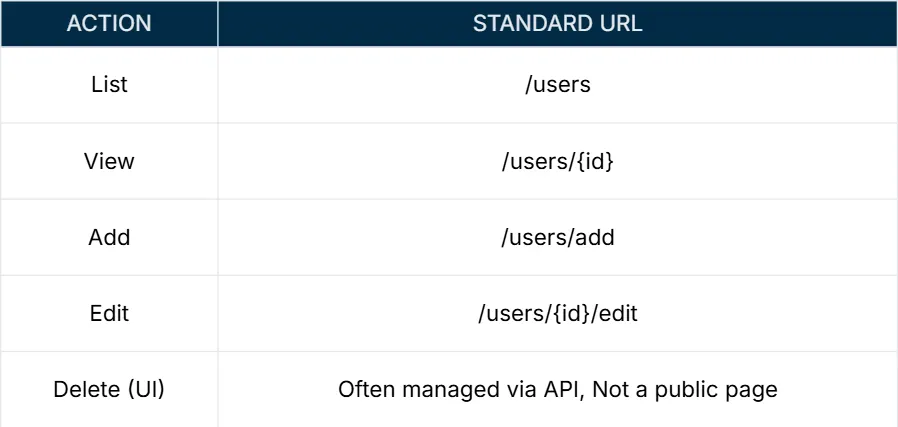
When your application supports create, read, update and delete operations, use consistent REST-like patterns:
/products
/products/handcrafted-cup
/products/handcrafted-cup/edit
/products/add

/admin/users
/admin/users/{id}
Three rules keep this clean: keep the base resource plural, use the same action words everywhere (/add, /edit), and never mix patterns - /users/123/edit, not /edit-user?id=123.
Query parameter standards
Query parameters follow the ? and carry additional, non-identifying data: filters, search terms, page numbers.
Use clear, descriptive names
/products?color=red&size=large/products?c=red&s=lSeparate multiple parameters with an ampersand
Start with ? and join subsequent pairs with &: /products?category=shoes&price=low
Encode your values
Any value containing a space or a reserved character must be percent-encoded: /search?query=spring%20fashion
Never put sensitive data in a query string
Query strings appear in browser history, server access logs, referrer headers and analytics tools. Passwords, tokens and personal identifiers do not belong there - ever.
Use them for filtering, searching and sorting - not identity
- Search with filters -
/search?query=laptop&brand=apple&price=low - Pagination -
/products?category=clothing&page=3 - Sorting -
/products?category=electronics&sort=price_asc
Hash fragments
A hash fragment follows the # and is never sent to the server. It is handled entirely by the browser, which makes it perfect for in-page navigation and client-side view state - and completely unsuitable for anything the server needs to know about.
Use them for in-page navigation
/about#team jumps directly to the team section.
Never use them to carry server-side data
Because the fragment is stripped before the request is sent, the server literally cannot read it. If a value needs to reach your backend, it belongs in the path or the query string.
Be descriptive
/services#pricing/services#section1Client-side routing
In single-page applications, fragments can drive view state without a page reload: /dashboard#user-profile. Modern SPAs mostly use the History API instead, but hash routing remains useful where server-side rewrites are not available.
Combining query parameters and hash fragments
When you need both, the order is fixed by the URL specification: query string first, fragment last.
/path?key1=value1&key2=value2#fragment

/products?category=shoes&page=2#reviews
Putting the fragment first silently breaks the query string, because everything after # is treated as part of the fragment.
Special characters and encoding
Percent encoding
Characters that have structural meaning in a URL - or that simply are not safe to transmit raw - must be percent-encoded: a % followed by two hexadecimal digits.
| Character | Encoded | Why it matters |
|---|---|---|
| Space | %20 | Terminates the URL in many parsers |
Ampersand & | %26 | Separates query parameters |
Question mark ? | %3F | Starts the query string |
Hash # | %23 | Starts the fragment |
Equals = | %3D | Separates key from value |
Forward slash / | %2F | Separates path segments |
Plus + | %2B | Means "space" in query strings |
Do not hand-roll this. Every language has an encoder:
// encode a single value
const q = encodeURIComponent("Men's Clothing & Shoes");
// => Men's%20Clothing%20%26%20Shoes

// build query strings safely
const params = new URLSearchParams({ query: "spring fashion", page: 2 });
const url = `/search?${params}`;
// => /search?query=spring+fashion&page=2
Reserved characters
These have structural meaning and must be encoded when they appear as content rather than syntax: ? starts the query, & separates parameters, # starts the fragment, / separates path segments, and = separates keys from values.
Keep the main path alphanumeric
/products/red-shoes/product~red%20shoes?sort=price&color=red%2FbluePeriods for file extensions, slashes for hierarchy
Use . only to separate a filename from its extension (/files/report.pdf) and / to express structure (/store/products/shoes/red). Do not invent your own separators.
Advanced standards
Avoid file extensions on HTML pages
Use /about, not /about.html. The extension leaks implementation detail and blocks you from changing technology later.
Pick a trailing slash policy
Either /about/ or /about - it genuinely does not matter which, as long as you choose one, apply it everywhere and 301-redirect the other. Serving both is a duplicate-content problem.
Handle pagination and filtering deliberately
Keep non-canonical variations in the query string and point them at a canonical URL: /products?page=2&sort=price-asc
Put the language first for multilingual sites
/en/products/
/fr/products/
Version APIs in the path
/api/v1/users is visible, cacheable and debuggable in a way that a version header is not.
Keep URLs speakable
If someone cannot read a URL aloud over a phone call, it is too complicated. That is a surprisingly good accessibility and usability test.
Skip stop words
Drop the, and, of unless they are part of a brand or genuinely change the meaning.
Technical and search considerations
Canonical tags. Any page reachable through multiple paths should declare one canonical URL.
Avoid deep nesting. Three or four levels is plenty. /a/b/c/d/e/f is a smell, not a hierarchy.
Generate slugs robustly. Strip special characters, collapse whitespace to hyphens, normalise accents (café → cafe), and enforce uniqueness at write time.
Never break an old URL. When structures change, add 301 redirects. A dead link is lost traffic and lost trust.
Maintain a sitemap and robots.txt. Give crawlers the map, and tell them which doors not to open.
Keep tracking data out of canonical URLs. Campaign parameters belong in analytics, not in the URL you publish.
Treat URLs as permanent. They are a public API. Changing one casually breaks every bookmark, backlink and integration pointing at it.
Cheat sheet
| Decision | Rule | Example |
|---|---|---|
| Case | Lowercase only | /about-us |
| Word separator | Hyphens, never underscores | /our-products |
| Hierarchy | Mirror the content structure | /blog/frontend/state |
| Identifiers | Slug for public, ID for internal, both when in doubt | /product/laptop-12345 |
| Query strings | Filter, sort and paginate only | /products?color=black |
| Fragments | In-page anchors and client state only | /faq#shipping |
| Encoding | Use the platform encoder, always | %20 for a space |
| Change | Redirect, never delete | 301 to the new path |
Your URLs are not just technical addresses. They are the visible structure of your product, the surface search engines read, and the thing people copy into a message to a colleague. Build them like you mean it.