When you build a web or mobile application, one of the first things you need is authentication - letting people sign up, sign in, and reach their data securely. And building that yourself is both time-consuming and genuinely risky. Security bugs in an auth system are not the kind you find out about gently.
That is where Amazon Cognito comes in. It handles sign-up, sign-in, password reset and access control in a managed, scalable way, so you can spend your time on the parts of the product that are actually yours.
This guide covers Cognito from scratch - and specifically the distinction that trips up almost everyone at the start: User Pools versus Identity Pools.
What Amazon Cognito is
Cognito is an AWS service that manages authentication, authorisation and user management for your application. It lets you add sign-up, sign-in, access control and identity federation to web and mobile apps with minimal backend work of your own.
Underneath, it implements industry standards - OAuth 2.0, OpenID Connect and SAML - and handles everything from storing user profiles to issuing and refreshing tokens.
In plain terms: your users can sign up, log in, reset passwords and reach your application securely, without you building and maintaining that machinery yourself.
The two components
Cognito splits into two services that are frequently confused because they are named similarly and often used together:
"Who are you?"
Authentication. Sign-up, sign-in, identity verification, tokens.
"What are you allowed to touch?"
Authorisation. Temporary AWS credentials for S3, DynamoDB, AppSync and friends.
The theme park analogy
When you visit a theme park you need two separate things: a ticket to get through the gate (proving who you are), and tokens inside the park to actually ride things and buy food.
Cognito works exactly like that. The User Pool is the ticket counter. The Identity Pool is the token booth inside.
User Pool - authentication
A User Pool is a managed user directory. It authenticates people directly, whether that is with an email and password, a phone number, or a federated identity provider.
It handles sign-up and sign-in, stores usernames, emails, phone numbers and password hashes safely, can connect to Google, Facebook or Apple sign-in, and issues a set of JWTs once authentication succeeds.
Example: you log in with your email and password. The User Pool verifies the credentials and, if they are correct, issues tokens that effectively say "yes, this is Abhay, and he is allowed in".
Key features of User Pools
- Managed user directory - a secure store for credentials that scales without you designing a schema for it.
- Built-in auth flows - sign-up, sign-in, password reset, email and phone verification, all provided.
- Flexible sign-in identifiers - email, phone number or username, plus social and enterprise providers via SAML and OIDC.
- Multi-factor authentication - SMS or TOTP apps such as Google Authenticator, enforced globally or made optional.
- Password policy and threat protection - configurable complexity rules, account lockout, CAPTCHA and adaptive authentication.
- Hosted UI - a ready-made, brandable sign-in page if you do not want to build one.
- Groups - organise users (Admin, Editor, Viewer) and attach different permissions per group.
- Lambda triggers - hook into pre-signup, post-authentication, pre-token-generation and more. Useful for things like auto-approving users from a known email domain, or injecting custom claims into a token.
The three tokens
After a successful sign-in a User Pool returns three JWTs, and knowing which one to use where prevents a lot of confusion:
| Token | What it carries | Use it for |
|---|---|---|
| ID token | User profile claims - email, name, groups | Identifying the signed-in user in your app |
| Access token | Scopes and permissions | Authorising calls to your own APIs |
| Refresh token | Long-lived renewal credential | Getting new tokens without a fresh login |
Sending the ID token to your API for authorisation. The ID token is about identity; the access token is about permission. Validate the access token on the server, and always verify the signature, issuer, audience and expiry - never trust a decoded payload on its own.
Identity Pool - authorisation
An Identity Pool (also called Cognito Federated Identities) does something different: it grants temporary AWS credentials so a client can talk directly to AWS services.
It does not authenticate anyone itself. It takes proof of identity that already exists - from a User Pool, from Google, Facebook or a SAML provider, or from nothing at all in the guest case - and exchanges it for short-lived credentials via AWS STS.
Example: you present the token from your User Pool. The Identity Pool responds with credentials that allow, say, uploading to one specific S3 prefix and reading from one DynamoDB table - and nothing else.
Key features of Identity Pools
- Federated identity - accepts User Pools, Google, Facebook, Apple, SAML and OpenID Connect providers.
- Guest access - unauthenticated identities get a limited role, useful for free-tier or preview features.
- Temporary credentials - short-lived keys issued through STS that expire automatically, instead of long-lived keys sitting in your client bundle.
- Role-based access control - map users or groups to different IAM roles. An admin can write to a bucket; a regular user can only read.
- Granular permissions - standard IAM policies, so you can scope access down to a specific bucket prefix or table.
- Cross-platform SDKs - web, iOS, Android and React Native.
If your frontend only talks to your own API - which then talks to AWS using its own execution role - a User Pool alone is enough. Reach for an Identity Pool when the browser or mobile client genuinely needs to call an AWS service directly.
Side-by-side comparison
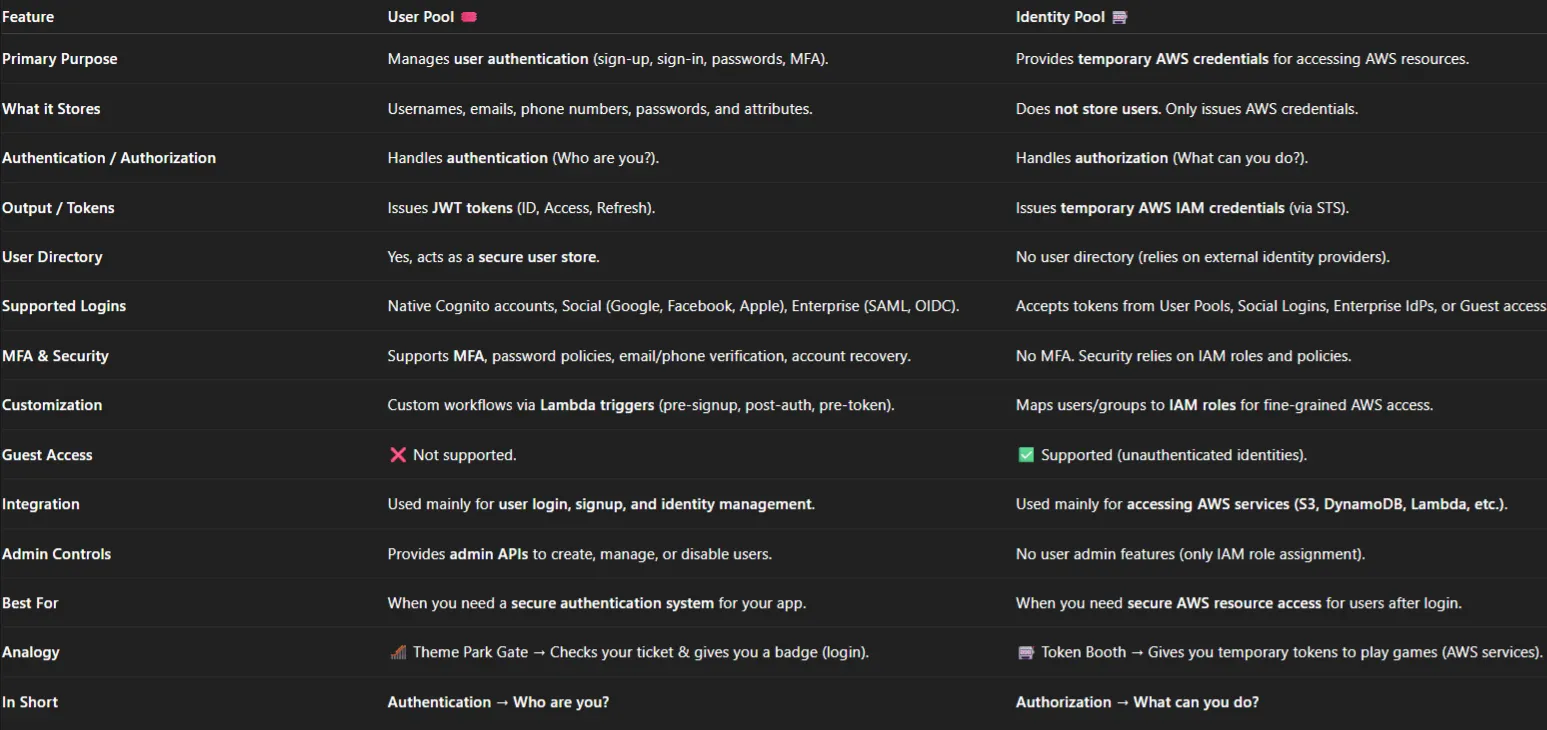
| User Pool | Identity Pool | |
|---|---|---|
| Core question | Who are you? | What can you access? |
| Concern | Authentication | Authorisation |
| What it returns | JWTs - ID, access, refresh | Temporary AWS credentials via STS |
| Stores users | Yes - it is a user directory | No - it only maps identities to roles |
| Sign-up and login UI | Yes, including a hosted UI | No |
| MFA and password policy | Yes | Not applicable |
| Guest access | No | Yes, unauthenticated identities |
| Typical use | Login for your app, tokens for your API | Browser uploads to S3, direct DynamoDB or AppSync access |
| Lambda triggers | Yes | No |
How they work together
The typical full flow, in order:
The user signs in against the User Pool with an email and password, or through a social provider.
The User Pool returns an ID token, an access token and a refresh token.
Your app uses the access token to call your own API, which validates it on the server.
If the client needs direct AWS access, it presents the ID token to the Identity Pool.
The Identity Pool exchanges it via STS for temporary credentials scoped to an IAM role.
The client calls S3, DynamoDB or AppSync directly, within exactly those permissions - and the credentials expire on their own.
Practical guidance
- Start with a User Pool. Most applications need only authentication, and adding an Identity Pool later is straightforward.
- Keep tokens short-lived. One hour for access tokens is a sensible default; use the refresh token rather than lengthening expiry.
- Never put long-lived AWS keys in a client. That is precisely the problem Identity Pools solve.
- Use groups for coarse roles, IAM policies for fine ones. Groups map cleanly to roles; the policy is where the real precision lives.
- Validate tokens server-side, every time. Signature, issuer, audience and expiry. A decoded JWT is not a verified one.
- Turn on advanced security features if your user base is at all likely to be targeted. Compromised-credential detection is cheap insurance.
In summary
Cognito gives you a clean division of labour: User Pools manage who someone is, and Identity Pools manage what they are permitted to reach. Together they turn a login screen into a complete, auditable path from sign-in to scoped access - without you writing, or maintaining, a single line of authentication logic.